Scan Documents to PDF
on iPhone
Paperlane turns a page of paper into a clean, multi page PDF with a searchable text layer, without an account and without a subscription.

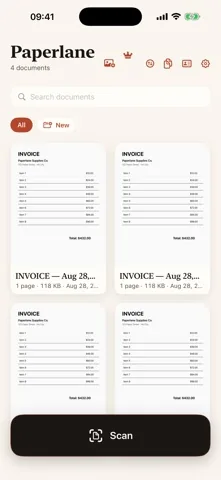
What one scan actually produces
Hold the iPhone over a page. Apple VisionKit finds the edges and straightens the perspective, you pick a page mode, and the save writes a real multi page PDF. On the way in, the pages are read on the device, so the file you get back can be searched by the words printed on it.
- A real PDFMulti page, correctly ordered, and readable in any PDF viewer. Not an image dressed up as a document, and never stamped with a watermark.
- A searchable text layerWritten on every scan, at no cost. The recognized words sit invisibly over the page image, so search and text selection work in Files, Preview, Mail and anywhere else.
- A name you did not typeThe first line the app recognizes becomes the document name, with the date after it. A receipt usually names itself after the shop.
- A private fileIt is written to a local library on the iPhone. No server receives it, because Paperlane does not have one.
The app, four screens in
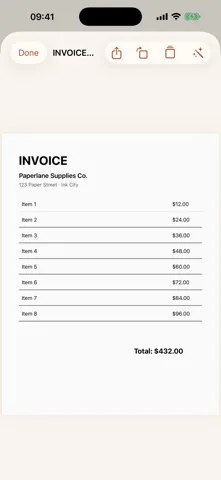
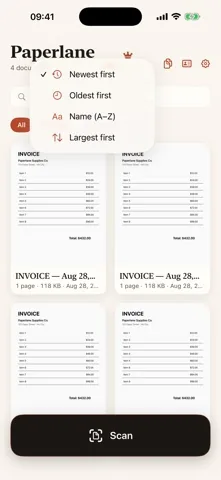
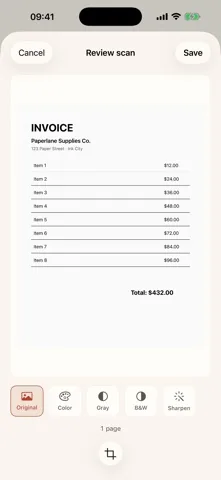
Real screenshots from version 2.1.0, not mockups.
Five things it does well
- One tap to the cameraThe scan button is the largest thing on the home screen. VisionKit captures page after page in one session, so a ten page contract is one document, not ten files.
- Recognition that costs nothingText recognition runs with Apple's Vision framework on save, on every scan, on the free tier. Most scanner apps put this behind a trial.
- A library you can actually searchType a supplier name, an invoice number or a word from the body text. Search looks through the recognized text of every document, and folders and favourites keep the rest in order.
- It works with the network offThere is no sign in, no sync and no upload step that can fail. Airplane mode changes nothing except that the ads stop loading.
- A one time toolkit on topPaperlane Pro adds text export to .txt and Word, JPG and PNG export, PDF compression, markup and signing, password protection, combining documents, and it removes the ads. One purchase, kept forever.
Exactly what is free and what is not
Nothing here is time limited and nothing expires. This is the whole line.
- Unlimited scans, no page cap
- Edge detection and perspective correction
- Page modes: Original, Color, Gray, B&W, Sharpen
- Manual crop before saving
- Searchable text layer on every scan
- Automatic naming from the recognized text
- Full text search across the library
- Folders, favourites, rename, duplicate, sort
- Reorder, delete and add pages
- Rotate a whole document
- ID mode: front and back on one page
- Import a photo from the photo library
- Face ID or passcode lock on the library
- Share to any app, no watermark
- Copy the recognized text
- Export text as .txt
- Export text as .docx for Word
- Smart rename from the document content
- Export a page as JPG or PNG
- Compress a PDF, three levels
- Markup and sign a page
- Save a business card as a contact
- Password protect a PDF
- Combine documents into one PDF
- Removes all advertising
About the ads. The free version is supported by advertising from Google AdMob: a banner under the library, and a full screen ad that can appear when you close a document, never in your first session and never more often than once every three minutes. Google's consent form asks you before the first ad loads, and Ad privacy in the settings lets you change that answer later. The ads never receive your documents, because recognition and PDF creation never leave the phone. Paperlane Pro removes advertising entirely.
What people actually scan
- How to scan a document to PDF on iPhoneThe built in ways, the steps for each, and when a dedicated scanner earns its place.
- A free PDF scanner app without a subscriptionThe five ways a free scanner stops being free, and a sixty second test for any of them.
- Searchable PDFs with on-device OCRWhat the invisible text layer is, how to check yours has one, and how to get the text out.
- Scan receipts and find them againA filing workflow for paper receipts, and an honest list of what this is not.
- Scan an ID card with both sides on one pageThe two capture flow that produces one page, and why it matters that it stays on the phone.
- How to sign a PDF on iPhoneApple Markup for free, scan and sign for paper, and what a drawn signature is not.
- An Adobe Scan alternativeWhere Adobe is the better tool, where an on-device scanner wins, and what you give up.
- A CamScanner alternative without a watermarkWhy free scanners watermark, and what a cloud scanner does that this one cannot.
Pricing, in one paragraph
The app is free. Paperlane Pro is $4.99 in the United States, once, and the App Store shows the local equivalent everywhere else. It is a non consumable in app purchase, so it never renews, and it restores on every iPhone signed in to the same Apple ID. There is no trial to forget about and no plan to cancel.
Questions
Is there a free way to scan documents to PDF on iPhone?
Yes. Paperlane scans to real, multi page PDFs for free, with no watermark, no page cap and no account. Edge detection and perspective correction come from Apple VisionKit, the same engine behind the system scanner. A one time Paperlane Pro purchase adds a toolkit on top, but scanning and PDF export stay free.
Does Paperlane put a watermark on my PDFs?
No. No tier of Paperlane stamps anything onto a page. Every scan exports as a clean multi page PDF that opens, prints and shares anywhere. The free version is paid for by ads inside the app instead, so the file you send carries no advertising and no branding.
Does Paperlane show ads?
The free version does. There is a banner at the bottom of the library, and a full screen ad can appear when you close a document, never in your first session and never more often than once every three minutes. Google's consent form asks you before the first ad loads, and you can change that answer later under Ad privacy in the settings. The ads never see your documents. Paperlane Pro removes all advertising.
How much does Paperlane cost?
Downloading and scanning are free. Paperlane Pro is a single purchase of $4.99 in the United States, priced in local currency elsewhere. It is a non subscription, non consumable in app purchase, so it does not renew, and it restores on any iPhone signed in to the same Apple ID.
Are my scans uploaded anywhere?
No. Paperlane has no servers, no account and no cloud sync. Capture, text recognition and PDF creation all run on the iPhone, and documents are stored in a local library. Because nothing is uploaded, the app works the same in airplane mode.
Are the PDFs searchable?
Yes, and that part is free. When a scan is saved, Apple's on device Vision framework reads the pages and writes an invisible text layer into the PDF, so search and text selection work in any PDF reader. Library search reads that text too, which means a word from inside a document finds the document.
Can I get the text out as a file?
Yes, with Paperlane Pro. It can copy the recognized text, export it as a .txt file, or export it as a .docx that opens in Word and Pages. The recognition itself already happened on the device when you saved the scan.
Does it work without an internet connection?
Yes. Scanning, recognition, PDF creation, search and export all run offline. An internet connection is only needed to load ads in the free version and to complete a purchase.
Support
Bug reports, refund help and feature ideas all go to the same inbox, and a person reads them.
Get Paperlane
Free on the App Store. Requires iOS 17.0 or later.